ApplyReadyCV scores five visible categories with transparent, browser-based rules.
The report can find common readability and relevance gaps, but it cannot reproduce every employer's system.
The useful outcome is a prioritized editing plan, not a perfect score.
What an ATS resume checker does
Applicant tracking systems help employers collect, parse, search, and manage applications. A resume checker reviews related risk areas before you apply: whether text can be extracted, whether key sections are easy to find, and whether the resume language matches the role.
ApplyReadyCV checks practical signals such as contact details, sections, skills, action verbs, measurable achievements, keyword overlap, and possible formatting extraction issues.
- Readable contact information
- Clear Experience, Skills, and Education sections
- Relevant job-description keywords
- Action verbs and measurable achievements
- Warnings for very short or oddly extracted text
ApplyReadyCV scoring methodology
The score is deterministic. The same resume text, job description, and selected mode produce the same result. The analysis runs locally in the browser and does not send resume content to a model or resume database.
Each category has a fixed maximum. The report combines the category values into a score out of 100, then shows the evidence and warnings behind that number.
- ATS readability: 25 points for extractable text, contact details, clear sections, action language, and basic formatting signals.
- Job match: 25 points based on meaningful overlap with the pasted job description.
- Clarity and achievements: 20 points for measurable evidence, action verbs, readable bullets, useful detail, and limited generic phrasing.
- Application or mode fit: 20 points for neutral evidence in General mode or specialized signals in Remote, Freelance, and Local modes.
- Completeness: 10 points for contact details, experience, skills, education, and enough supporting detail.
How to use ApplyReadyCV's ATS checker
Start by pasting your resume text or uploading a supported file. If you have a target role, paste the job description too. The job description gives the checker a better basis for keyword matching.
After the report appears, review the top fixes first. A missing keyword list is useful, but only add terms that truthfully reflect your experience, tools, projects, education, or certifications.
- Open the ATS Resume Checker.
- Paste or upload your resume.
- Paste the job description when available.
- Review missing keywords, warnings, and top fixes.
- Edit your resume, then run another check.
Formatting rules that reduce parsing problems
ATS-friendly formatting is mostly about making text easy to extract. Use standard section labels, simple bullets, and consistent spacing. Avoid hiding important content inside images, text boxes, headers that may not extract, or complex design elements.
This does not mean every resume must look plain. It means the important information should still make sense if copied into a text editor.
- Use common headings such as Experience, Skills, Education, Projects, and Certifications.
- Keep job titles, employer names, dates, and locations easy to scan.
- Use bullets that show actions and outcomes, not only tasks.
- Save a clean version for roles that require ATS submission.
What this methodology cannot determine
Employers configure different application systems, knockout questions, workflows, and human review steps. ApplyReadyCV cannot see those settings, reproduce a recruiter's judgment, or guarantee that a document will be accepted.
Text extraction can reveal missing or scrambled content, but it cannot fully judge every visual layout choice. Review the original file, the extracted text, and the employer's instructions before submitting.
Sample report walkthrough
The sample uses a fictional project coordinator named Alex Morgan and a fictional job description. No real applicant data appears in the screenshot.
Read the report from the largest decision to the smallest detail. Start with the overall score, then use the category breakdown and top fixes to decide what to edit first.
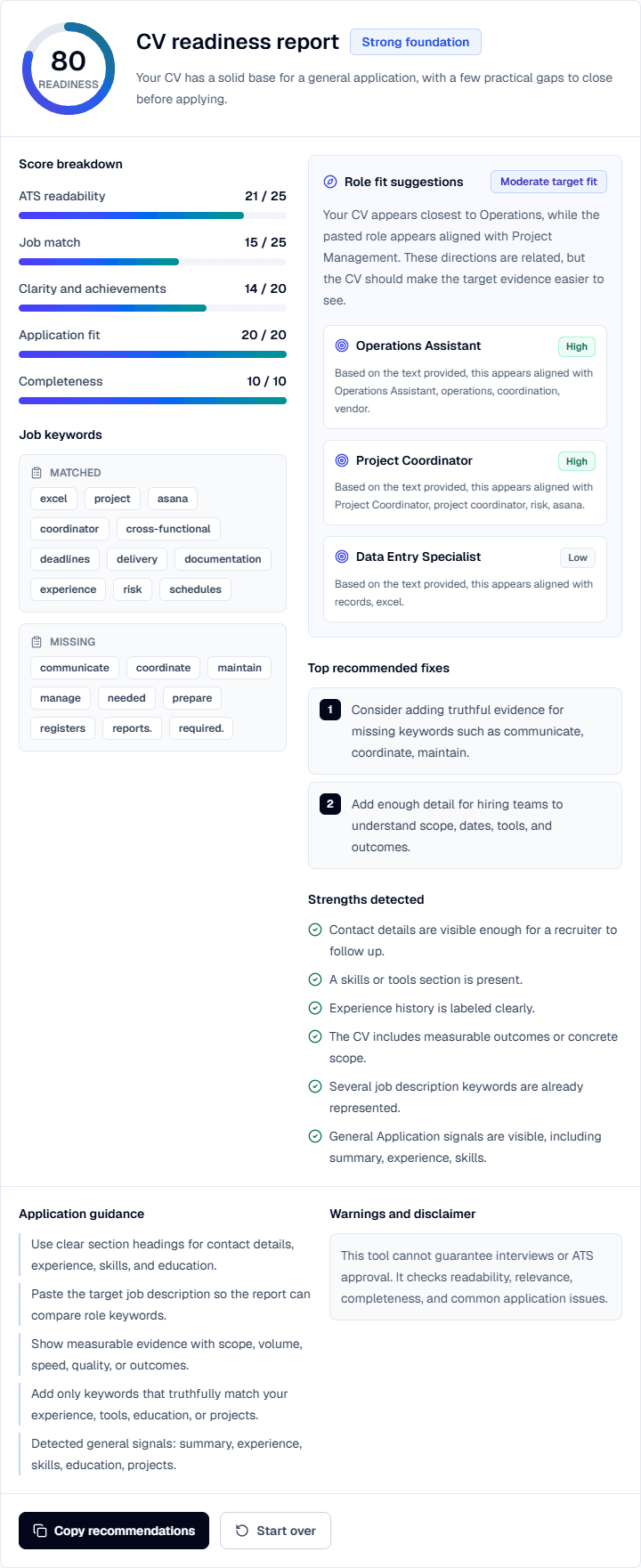
- Check the total score as a starting point, not a hiring prediction.
- Find the lowest category and inspect the related warnings.
- Complete the top fixes before polishing minor wording.
- Review matched and missing keywords, then add only terms supported by real evidence.
- Edit the resume and rerun the check instead of chasing a perfect score.
What to do after the checker finds issues
Do not chase a perfect score. Use the result to fix the most important gaps: missing core skills, unclear sections, weak achievements, or formatting that appears difficult to extract.
A strong resume still needs to work for a human reader. Keep the document concise, truthful, and tailored to the role.
FAQ
Can an ATS checker guarantee my resume will pass?+
No. Different employers use different systems and settings. A checker can help find common risks, but it cannot guarantee ATS approval, interviews, or job offers.
Should I add every missing keyword?+
No. Add only keywords that accurately describe your real skills, tools, experience, education, or projects.
Is simple formatting always better?+
Simple, readable formatting is usually safer for online applications. You can still keep a polished design as long as the important text remains easy to extract and scan.
Sources and further reading
These references support the research and practical guidance used in this article.