Use clear section labels
Labels like Experience, Skills, Education, Projects, and Certifications help both systems and people understand the document.
Interactive ATS resume check
Paste your resume, add a job description when available, and get a practical ATS-style report in your browser. The tool checks common readability and relevance signals without claiming to predict an employer's decision.
Run the check without creating an account or storing your resume.
Review readable structure, keyword alignment, achievements, and completeness in one report.
Use the score to prioritize edits, not as a guaranteed ATS outcome.
Run the free check
Paste your resume text or upload a TXT, PDF, or DOCX file, then add a job description for keyword matching. Everything is analyzed privately in your browser — no account, upload, or stored resume data.
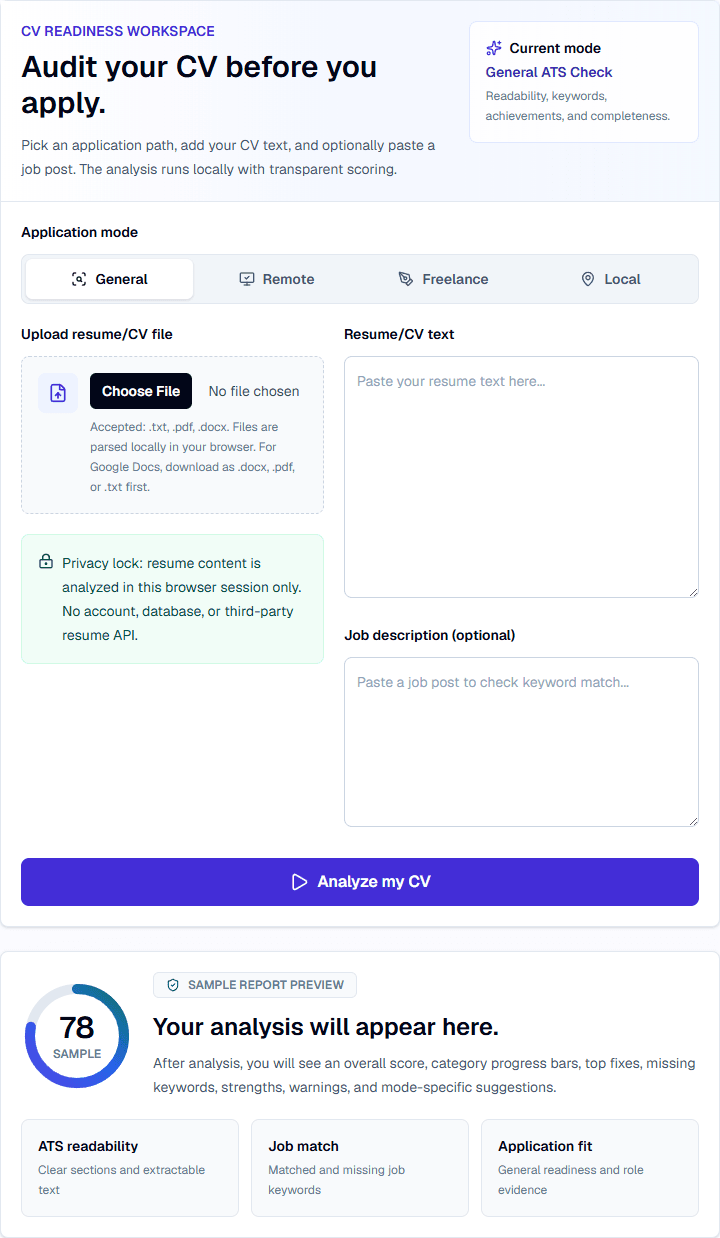
CV Readiness Workspace
Pick an application path, add your CV text, and optionally paste a job post. The analysis runs locally with transparent scoring.
General ATS Check
Readability, keywords, achievements, and completeness.
Accepted: .txt, .pdf, .docx. Files are parsed locally in your browser. For Google Docs, download as .docx, .pdf, or .txt first.
Privacy lock: resume content is analyzed in this browser session only. No account, database, or third-party resume API.
After analysis, you will see an overall score, category progress bars, top fixes, missing keywords, strengths, warnings, and mode-specific suggestions.
ATS readability
Clear sections and extractable text
Job match
Matched and missing job keywords
Application fit
General readiness and role evidence
Labels like Experience, Skills, Education, Projects, and Certifications help both systems and people understand the document.
Avoid layouts that depend on images, text boxes, unusual columns, or complex graphics when you need reliable parsing.
TXT, PDF, and DOCX files can be parsed locally in the browser. If extraction looks weak, paste the resume text directly.
Use wording from the job description when it accurately reflects your experience, tools, or responsibilities.
A resume still needs to persuade a person. Keep bullets concise, specific, and outcome-focused.
Different systems parse resumes differently. A score can point to issues, but it cannot guarantee approval.
Repeating terms without evidence can reduce clarity. Add keywords where they fit real skills, tools, or achievements.
If copied text appears scrambled or missing, a system may also struggle with the file. Paste text review can reveal formatting problems.
Icons, sidebars, headers, footers, images, and text boxes can look polished but may hide names, dates, skills, or job titles from parsers.
Reviews extractable text, contact details, standard headings, action language, and basic formatting signals.
Compares meaningful job-description terms against the resume so missing terms become review prompts, not stuffing instructions.
Checks action verbs, measurable achievements, role-fit signals, contact details, experience, skills, education, and enough detail to review.
Use the checker before uploading a resume into an employer portal or applicant tracking system.
Review whether a new template still keeps important text extractable and easy to scan.
Compare the resume with the target job post before adding terms that need supporting evidence.
A resume with the name in an image, skills in icons, and dates in a sidebar may look clean but can produce incomplete extracted text.
Use text-based contact details, standard headings, concise bullets, and a focused skills section that matches real experience.
A missing keyword is a review prompt. Add it only where it accurately describes your skills, tools, projects, education, or experience.
Use this quick check before uploading a resume into an online application portal.
| Check | Better approach | Why it matters |
|---|---|---|
| Contact details | Use selectable text for name, email, phone, and links. | Parsers and recruiters need the same core details. |
| Section headings | Use Experience, Skills, Education, Projects, and Certifications. | Standard labels make the resume easier to scan. |
| Layout | Prefer clean single-column text for ATS-heavy submissions. | Complex columns and text boxes can scramble reading order. |
| Keywords | Place truthful terms in summary, skills, and experience bullets. | Keywords work best when backed by evidence. |
| Weak resume text | Improved resume text |
|---|---|
| Used CRM and helped customers. | Resolved 30+ daily customer inquiries in Zendesk, documented account notes, and escalated billing issues to the support lead. |
| Responsible for reports. | Prepared weekly Excel reports for inventory updates and shared action items with the branch supervisor. |
You will see an overall score, ATS readability signals, formatting warnings, matched keywords, missing terms, and top fixes.
Use the result to improve structure and evidence, then check the employer's instructions before submitting.
Resume text is analyzed in the current browser session. ApplyReadyCV does not guarantee ATS approval and does not store a resume database.
No. No simple checker can guarantee ATS approval. The tool reviews common readability and relevance issues only.
Not always, but clean section labels and extractable text are useful when a resume must pass through automated parsing.
Not necessarily. Focus on readable text, clear hierarchy, and formats that do not hide important information.
No. The current checker does not require an account or email field, and resume text is reviewed in the browser session.