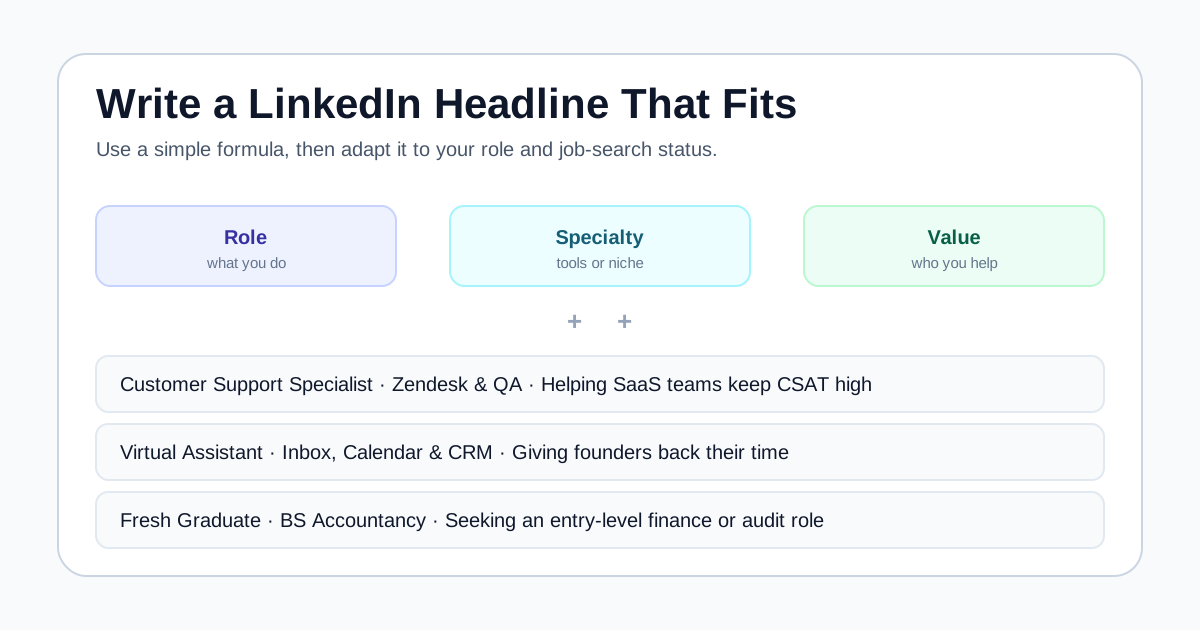
A strong headline names your role, a specialty or key tool, and one piece of honest proof.
Pick a simple formula, then adapt the wording to your role and current job-search status.
Keep your headline, resume, and profile consistent so the same story shows up everywhere.
What a LinkedIn headline is and why it matters
The headline is the short text directly under your name at the top of your profile, with room for up to 220 characters. It is one of the most visible parts of your profile because it travels with you: it appears in LinkedIn search results, next to your name when you comment or post, in connection requests, and in messages. A vague or default headline wastes that visibility.
By default, LinkedIn sets your headline to your current or most recent job title. That is fine as a starting point, but a title alone rarely tells a reader what you actually do or who you help. A headline like Customer Service Representative says little next to Customer Service Representative | Voice and Chat Support | CSAT-Focused, which signals your channel, your priority, and your specialty in the same glance.
Be honest about what a headline can and cannot do. It will not guarantee that a recruiter contacts you, and no phrasing bypasses the actual review of your experience. What a clear headline does is make you easier to understand and easier to find, so the rest of your profile and your resume can do the real work.
Headline formulas that work
Most effective headlines follow a simple pattern: your role, plus a specialty or tool, plus a short piece of value or proof. You do not need all three every time, but two of them usually beat a lone job title. The separator you use, most often a vertical bar, comma, or bullet, is a matter of style; readability matters more than the symbol.
Use the formulas below as scaffolding, then swap in your own words. Keep each piece truthful. Numbers and named tools are strong because they are concrete, but only include a metric you could defend if asked. If you do not have a clean number yet, a specialty and the type of person or team you support still works well.
Headline formulas mapped to examples
Pick a formula that fits your situation, then replace the bracketed parts with your own honest details.
| Formula | Example headline |
|---|---|
| [Role] + [Specialty] + [Proof] | Customer Service Rep | Voice and Email Support | 95% CSAT Over 2 Years |
| [Role] + [Tools] + [Who you help] | Virtual Assistant | Notion, Slack and Asana | Helping Coaches Stay Organized |
| [Current role] to [Target role] + [Proof] | Sales Associate to Aspiring Data Analyst | Google Data Analytics Certified |
| Open to [roles] + [Skills] + [Availability] | Open to Remote Bookkeeping Roles | QuickBooks Certified | Available Now |
| [Degree or status] + [Focus] + [Attitude] | BS Information Technology Graduate | Java and Python | Ready to Learn Fast |
| [Role] + [Industry] + [Outcome] | Project Manager | Fintech | Shipping Features Across 3 Time Zones |
LinkedIn headline examples by role
The examples below span roles common among global job seekers, including BPO and customer service, virtual assistance, development, data, sales, and creative work. Each names a role, adds a specialty or tool, and closes with a short signal of value. Treat them as templates, not scripts: change the tools, numbers, and specialties to match what you can honestly claim.
Notice that none of these promise results to an employer or use inflated labels like guru or ninja. Plain, specific language is easier to search and easier to trust. If a headline feels crowded, drop the weakest element rather than shrinking the font of your credibility.
Original headline examples across 12 roles
Adapt the wording, tools, and metrics to your own experience before using any of these.
| Role | Example headline |
|---|---|
| Customer service / BPO | Customer Service Representative | Voice and Chat Support | Handling 60+ Tickets Daily |
| Virtual assistant | Virtual Assistant | Calendar, Inbox and Travel Management | Helping Founders Save 10+ Hours a Week |
| Front-end developer | Front-End Developer | React and TypeScript | Building Accessible, Fast Web Apps |
| Data analyst | Data Analyst | SQL, Power BI and Excel | Turning Raw Data Into Clear Decisions |
| Bookkeeper / accounting | Bookkeeper | AP/AR and Reconciliation | QuickBooks and Xero Certified |
| Sales | SaaS Account Executive | SMB and Mid-Market | Consistent Quota Attainment |
| Graphic designer | Graphic Designer | Brand Identity and Social Assets | Figma and Adobe Creative Suite |
| Content writer | Content Writer and SEO Specialist | Long-Form Blogs That Rank | 200+ Articles Published |
| Project manager | Project Manager | Agile and Scrum | Delivering Cross-Functional Projects On Time |
| Registered nurse | Registered Nurse | Med-Surg and Telemetry | Patient-First, Detail-Oriented Care |
| HR / recruitment | Recruiter | Tech and BPO Hiring | Sourcing, Screening and Candidate Experience |
| Digital marketer | Digital Marketer | Paid Social and Email | Growing Small Brands With Small Budgets |
Headline examples by job-search status
Your headline should reflect where you are in your search, not just your job title. Someone actively looking wants to signal availability and direction; someone employed but open wants to stay discoverable without broadcasting a search to their current employer. The examples here cover four common situations.
For active seekers, naming target roles and availability helps recruiters match you. LinkedIn also has a separate Open to Work setting that can add a badge or share your search privately with recruiters, which is different from what you type in the headline itself. For career changers, a short from-to phrase plus a credential or portfolio makes your direction obvious so readers do not assume your old title is your goal.
Fresh graduates often feel they have nothing to put in a headline, but your degree, a couple of skills, and a genuine willingness to learn are enough to start. If you are still building experience, our guide on how to write a resume pairs well with this, since the same honest, specific language works in both places.
- Open to work: Open to Customer Support Roles | Voice and Email | 3 Years in BPO | Available Immediately
- Employed but open: Operations Coordinator | Process Improvement and Reporting | Quietly Exploring New Opportunities
- Career changer: Transitioning From Teaching to UX Design | Certified in User Research | Portfolio Ready
- Fresh graduate: Marketing Graduate | Social Media and Content | Eager to Grow With a Data-Driven Team
Common headline mistakes to avoid
The most common mistake is leaving the default job title in place, which tells readers nothing beyond your current role. The second is the opposite problem: stuffing the line with every keyword and buzzword until it becomes unreadable. A headline crammed with ten skills separated by bars is harder to scan than three well-chosen ones.
Watch for claims you cannot support. Words like expert, guru, or best-in-class invite skepticism and are easy to challenge in an interview. Vague inspiration such as passionate about making a difference sounds nice but says nothing about what you do. Replace it with the concrete work: the role, the tool, the outcome.
Finally, avoid a headline that quietly contradicts your resume or profile. If your headline says data analyst but your experience and resume still read customer support with no analytics evidence, the mismatch creates doubt. Consistency across your resume, headline, and profile is what makes the whole application feel credible.
- Do not leave only the default job title if you can add a specialty or proof.
- Do not stack more than three or four elements in one headline.
- Avoid unprovable superlatives like expert, guru, ninja, or rockstar.
- Skip vague filler such as passionate professional with no specifics.
- Do not claim a target role your profile shows no evidence for yet.
Keep your headline, resume, and profile in sync
A headline is one signal in a larger picture. When a recruiter clicks through, they compare your headline to your About section, your experience, and often the resume you submitted. If those tell the same story, you look focused; if they conflict, you look uncertain. Before you finalize a headline, glance at your resume summary and make sure the direction matches. Our guide on resume summary examples can help you phrase that opening line so it echoes your headline naturally.
It is also worth deciding whether to list your profile on your resume at all, and in what form. If your profile is current and consistent, adding a clean link is usually a plus; if it is outdated, fix it first. Our guide on adding a LinkedIn URL on your resume walks through that decision and how to tidy the public URL.
Once your resume reflects the same role, skills, and direction as your headline, run it through ApplyReadyCV. The checker reviews readability, keywords, achievements, completeness, and job fit in your browser, so you can confirm the story a recruiter sees on LinkedIn is backed by the evidence in the document you actually send.
- Match the role in your headline to the top of your resume and profile.
- Use the same key skills and tools in your headline and resume where truthful.
- Fix an outdated profile before linking it from your resume.
- Check that your resume backs up the direction your headline promises.
FAQ
How long can a LinkedIn headline be?+
You can use up to 220 characters in your LinkedIn headline. You do not need to fill all of it. Two or three clear elements, such as your role, a specialty, and one proof point, usually read better than a long line packed with keywords.
Should I put Open to Work in my headline?+
You can, and it is a fair signal if you are actively searching and comfortable being visible. Note that LinkedIn also has a separate Open to Work feature with a badge and a private option for recruiters, which is different from the text you type into the headline itself. Choose based on how public you want your search to be.
What is the difference between a headline and a summary?+
The headline is the short line under your name, up to 220 characters, meant to be scanned in a second. The summary, or About section, is a longer paragraph where you explain your background, strengths, and goals. The headline is the hook; the summary is the context behind it.
Do keywords in my headline help me get found?+
Relevant, honest keywords, such as your real role and core tools, can make you easier to find in LinkedIn searches. They do not guarantee that recruiters reach out, and stuffing unrelated terms hurts readability more than it helps. Use words that genuinely describe your work.
Sources and further reading
These references support the research and practical guidance used in this article.