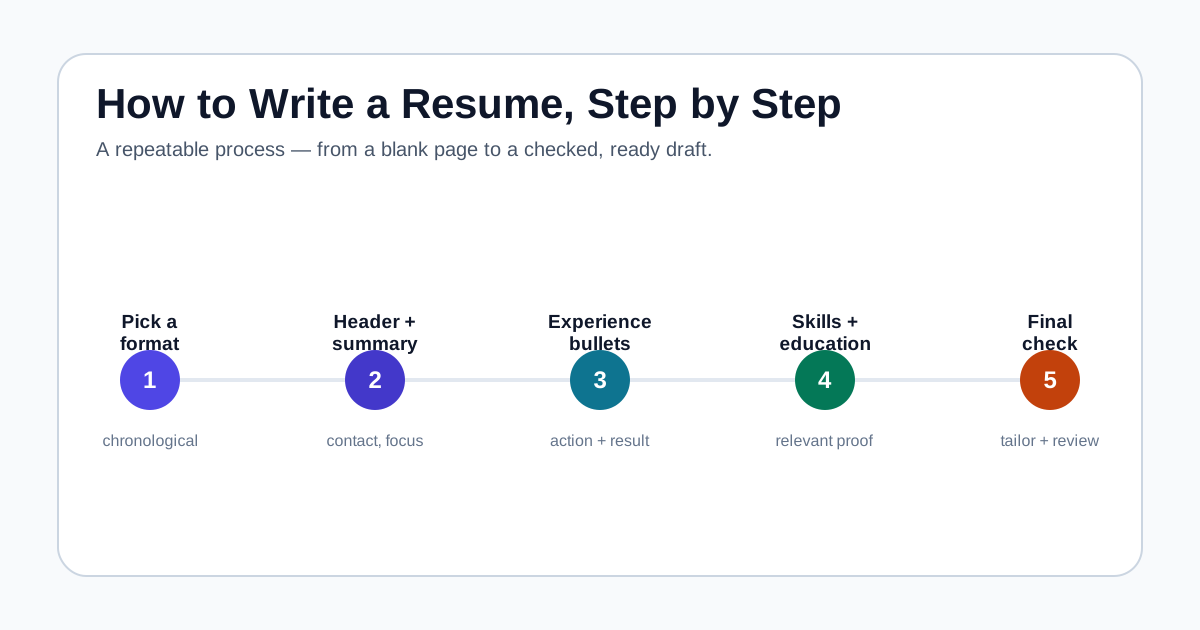
A reverse-chronological format is the safest starting point for most job seekers and for ATS software.
Every section has one job: your header helps people reach you, and your experience bullets prove what you did.
A finished draft is not a ready application until you proofread, tailor it to the job, and run a final check.
Start by choosing a resume format
Before you write a single line, decide how the page will be organized. The format controls what a recruiter sees first and how easily applicant tracking software can read your history. Three layouts cover almost every situation: reverse-chronological, functional, and combination.
The reverse-chronological format lists your most recent job first and works backward. It is the most familiar to recruiters and the safest for ATS parsing, so most people should use it. The functional format leads with skills and downplays dates, which can help career changers or people with gaps, but it sometimes raises questions and can confuse parsing software. The combination format keeps a skills-focused top section and a dated work history below, giving you flexibility without hiding your timeline.
If you are unsure, start with reverse-chronological and change it only if your situation truly needs something else. Our guide on resume format types compares each layout in more depth, but the table below gives you a quick way to decide.
- Save and send as a PDF unless the posting specifically asks for .docx.
- Use one clear font and consistent spacing throughout.
- Avoid text boxes, multiple columns, and images that ATS software may misread.
- Name the file with your name and the role, such as maria-santos-customer-support.pdf.
Comparing the three main resume formats
Use this to pick a starting layout, then adjust only if your history calls for it.
| Format | Best for | Watch out for |
|---|---|---|
| Reverse-chronological | A steady history in the same or a related field | Recent gaps or frequent short stints are visible |
| Functional (skills-based) | Career changers, large gaps, or first-time job seekers | Some recruiters distrust it, and ATS parsing can struggle |
| Combination | Showing skills while keeping a clear timeline | Can run long if you repeat the same skills and duties |
Write a contact header recruiters can actually use
The top of your resume is not the place to be creative. Include your name, a phone number, a professional email address, your city and country or region, and a link to your LinkedIn profile or portfolio. That is enough for a recruiter to identify you and reach out quickly.
Leave off your full street address, date of birth, marital status, and a photo unless a specific market or employer clearly requires them. Use an email that is some version of your real name rather than a nickname from years ago, and if you add a LinkedIn URL, shorten it so it is clean and readable. Our resume contact information guide and the guide on adding a LinkedIn URL cover the details.
Keep this section compact. It should sit at the very top, take only a line or two, and never push your experience below the fold on the first page.
- Full name, slightly larger than the body text
- Phone number with a country code if you apply internationally
- A professional email you check regularly
- City and country or region, not a full home address
- One link: LinkedIn, a portfolio, or a personal site
Open with a short summary that frames your fit
A summary is two to four sentences under your header that tell the reader who you are professionally and what you are targeting. It is optional, but it helps when a recruiter skims the top third of the page in only a few seconds.
Keep it specific. Name your role or field, your years or type of experience, one or two genuine strengths, and the kind of work you want. Avoid empty phrases such as hardworking team player seeking growth, because they describe almost everyone and prove nothing. Concrete details do more work in less space.
If you are early in your career, a summary can still work by focusing on your field of study, your strongest skills, and the type of role you are pursuing. Our resume summary examples guide shows strong openings for support, admin, virtual assistant, and entry-level applicants.
- Include: your role or field, experience level, one or two key skills, and your target.
- Include: language a recruiter will recognize from the job posting.
- Avoid: generic adjectives with no evidence behind them.
- Avoid: an objective that only says what you want without what you offer.
Build the experience section with achievement bullets
This is the part recruiters read most closely, so give it the most care. For each job, list your title, the employer, the location, and the dates. Then add three to six bullets that show what you did and what changed because of your work.
Start each bullet with a specific action verb, name the work plainly, and add evidence you can defend. Numbers help when they are true, but scope, frequency, tools, and outcomes count too. Never invent a metric, because a recruiter can ask about any line during an interview. Our resume action verbs guide and the accomplishment examples guide give you language and before-and-after models to work from.
The difference between a duty and an achievement is usually one added detail. The examples below are not templates to copy word for word; they show how an ordinary responsibility becomes stronger when you add truthful scope or a result.
- Put the strongest, most relevant bullet first under each role.
- Vary your action verbs so bullets do not all begin the same way.
- Quantify honestly, and use frequency or scope when you lack exact figures.
- Tie each bullet to the target role rather than describing the whole team.
Turning duties into achievement bullets
| Duty-only bullet | Stronger achievement bullet |
|---|---|
| Answered customer calls. | Handled 40-60 customer calls per shift, resolving billing and account issues without escalation. |
| Did data entry. | Entered and verified 300+ records per day in the CRM, keeping error rates low during peak season. |
| Helped with social media. | Scheduled weekly posts across 3 platforms and tracked engagement to repeat the formats that performed best. |
| Managed the front desk. | Coordinated the front desk for a 20-person office, screening calls and visitors and keeping the shared calendar current. |
Add a skills section and education
Your skills section should list the tools, technical abilities, and role-specific capabilities you can genuinely back up. Match them to the job description without copying it word for word, and group them into categories if you have many. Soft skills are fine here, but they land harder when your experience bullets already demonstrate them. The resume skills section guide shows how to turn posting language into a focused list.
For education, include your degree or program, the institution, and the graduation year or expected date. Fresh graduates can place education higher on the page and add relevant coursework, honors, or projects, which is exactly what our fresh graduate CV guide recommends. Experienced candidates keep this section short and near the bottom.
If you hold certifications or licenses that matter for the role, such as a CPA, an NC II, or a Google certificate, add a short section for them. List only what is current and relevant to the job you want.
- Group skills, for example: tools, technical, and languages.
- List only skills you could discuss confidently in an interview.
- Place education first when you are a recent graduate.
- Add certifications and licenses that are current and role-relevant.
Run a final ATS and keyword check before you send
A finished draft is not the same as a ready application. Read it once for accuracy, once for clarity, and once for how well it fits the specific job. Fix typos, inconsistent verb tenses, and dates that do not line up, since small errors quietly undermine an otherwise strong resume.
Then compare your resume against the job description. The strongest keywords are the skills and tools that appear in the posting and truthfully match your experience. Place them naturally in your summary, skills, and bullets rather than in a hidden list. Our resume keywords guide and the guide on tailoring a resume to a job description explain how to do this without stuffing.
Finally, run it through a checker. ApplyReadyCV reviews readability, keywords, achievements, and completeness right in your browser, so nothing is uploaded anywhere. Treat the report as an editing aid, not a promise: no tool can guarantee interviews, recruiter decisions, or automatic ATS approval.
- Proofread for typos, tense consistency, and matching dates.
- Compare your resume against each specific job description.
- Confirm the layout is simple enough for software to parse.
- Run the checker again after editing so the report reflects the final version.
FAQ
How long should a resume be?+
One page is right for most people with under about ten years of relevant experience. Two pages are fine when you have enough relevant history to fill them. When trimming, remove older or unrelated roles first, not your strongest recent work.
Do I need both a summary and an objective?+
A short summary is usually more useful than an objective. Use a summary to frame who you are and what you offer. Only add an objective if you are changing fields and want to state your target directly, and keep it to one line.
What should I write if I have no work experience?+
Lead with education, skills, coursework, volunteer work, and projects that show what you can do. Our no-experience CV guide walks through this in detail, including how to present academic and personal projects as real evidence.
Should I use the same resume for every job?+
Keep one strong base version, then tailor the summary, skills, and top bullets to each posting using its language and keywords. This is far more effective than sending an identical file to every employer.
Sources and further reading
These references support the research and practical guidance used in this article.